Quickly open to file and position a cursor with vim
Answer:
To open a file and automatically move the cursor to a particular line number
# vi +80 test.txt
The vim will move the cursor to line 80 when opened the file.

Linux Ask! is a Q & A web site specific for Linux related questions. Questions are collected, answered and audited by experienced Linux users.

Quickly open to file and position a cursor with vim
Answer:
To open a file and automatically move the cursor to a particular line number
# vi +80 test.txt
The vim will move the cursor to line 80 when opened the file.
Count the number of matching lines from grep
Answer:
grep command is useful for searching file's content by a key string, e.g.
# grep foo text.txt
All the lines matching foo will be printed.
However, to only print the number of matching lines, you can use the -c flag
# grep -c foo text.txt
4
There are total 4 lines match the word foo.
Installing Python modules with easy_install
Answer:
Install Python modules cannot be easier with easy_install.
To use easy_install, you can use apt-get to install the "python-setuptools" package
# sudo apt-get install python-setuptools
Then you can use easy_install to install the module you want, e.g. pymongo
# sudo easy_install pymongo
SSHMenu: SSH connections manager for GNOME
Answer:
SSHMenu is a GNOME panel applet* that keeps all your regular SSH connections within a single mouse click.
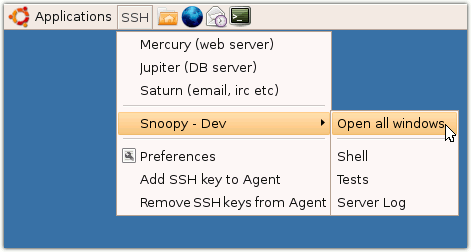
Highly recommended if you need to manage a lot of SSH sessions.
Official homepage: http://sshmenu.sourceforge.net/
