Linux Ask!

Linux Ask! is a Q & A web site specific for Linux related questions. Questions are collected, answered and audited by experienced Linux users.

SSH takes a long time to connect or log in

Answer

If you experienced slow SSH connect to a remote server, you can try to disable the reverse DNS lookup at the server.

1. Edit the sshd_config

# sudo vi /etc/ssh/sshd_config

2. Add the following line in sshd_config

UseDNS no

3. Restart sshd

# sudo /etc/init.d/ssh restart

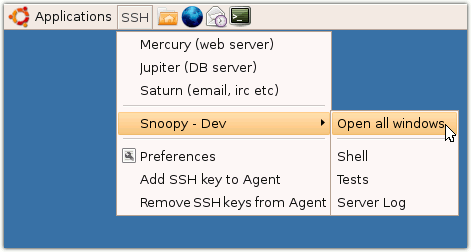
SSHMenu: SSH connections manager for GNOME

Answer:

SSHMenu is a GNOME panel applet* that keeps all your regular SSH connections within a single mouse click.

Highly recommended if you need to manage a lot of SSH sessions.

Official homepage: http://sshmenu.sourceforge.net/

Prevent go way SSH session killing running job

Answer:

If you are executing a long running job over SSH session, when your SSH session is terminated for whatever reason, e.g. unstable network connection. Your long running job will die (it will receive a hangup/hup signal) when the SSH session was killed.

To overcome this, when executing long running job over SSH, use the following way

nohup program &

How to install SSH server in Ubuntu?

Answer:

If you did not select to install the OpenSSH server during Ubuntu setup process, you can install afterward using the command

sudo apt-get install openssh-server

And make sure the OpenSSH server is running, by

sudo /etc/init.d/ssh restart

Reference: https://help.ubuntu.com/7.04/server/C/openssh-server.html

Should I use Telnet and FTP for remote access?

Answer:

In a word, No.

The problem with Telnet, FTP, and other non-encrypted protocols is that everything is sent across the network as plain text. This means that someone running a sniffing program on the network, which is very simple under many circumstances, can see all of your traffic - including your login and password.

Consider replacing Telnet and FTP with SSh.

Source: http://www.linuxsecurity.com/docs/colsfaq.html#4.6