Kill all processes listening on a particular port
Answer:
To kill all processes listening on a particular port, e.g. port 80
# kill -9 $( lsof -i:80 -t )
Replace 80 by the port you want.
Linux Ask! is a Q & A web site specific for Linux related questions. Questions are collected, answered and audited by experienced Linux users.
Kill all processes listening on a particular port
Answer:
To kill all processes listening on a particular port, e.g. port 80
# kill -9 $( lsof -i:80 -t )
Replace 80 by the port you want.
SSHMenu: SSH connections manager for GNOME
Answer:
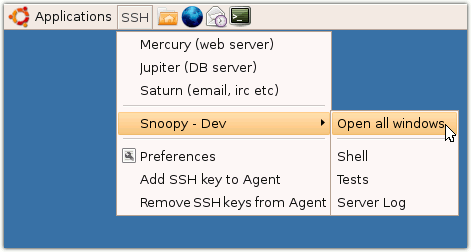
SSHMenu is a GNOME panel applet* that keeps all your regular SSH connections within a single mouse click.

Highly recommended if you need to manage a lot of SSH sessions.
Official homepage: http://sshmenu.sourceforge.net/
Put a profile in AppArmor complain mode
Answer:
Some applications, such as the MySQL server, if you changed the default datadir, you might not be able to startup MySQL.
To solve the problem, put the MySQL profile in AppArmor complain mode can solve the problem.
# sudo aa-complain /usr/sbin/mysqld
Then reload AppArmor
# sudo invoke-rc.d apparmor reload
How to check failed login attempt in Ubuntu
Answer:
Every login attempts are logged in the file /var/log/auth.log in Ubuntu.
To check failed login attempt(s),
E.g.
# grep 'Failed password' /var/log/auth.log
Jan 31 14:00:27 localhost sshd[16141]: Failed password...
Jan 31 14:00:46 localhost sshd[16141]: Failed password...
Jan 31 14:00:49 localhost sshd[16141]: Failed password...
Disable AppArmor in Ubuntu
Answer:
A lot of people don't like AppArmor and think it is too annoying, just like the SELinux, people sometimes want to disable it.
To do so:
# sudo invoke-rc.d apparmor stop
# sudo update-rc.d -f apparmor remove